
Apple MacBook Neo for Music Production: Is the $599 Laptop Worth It?
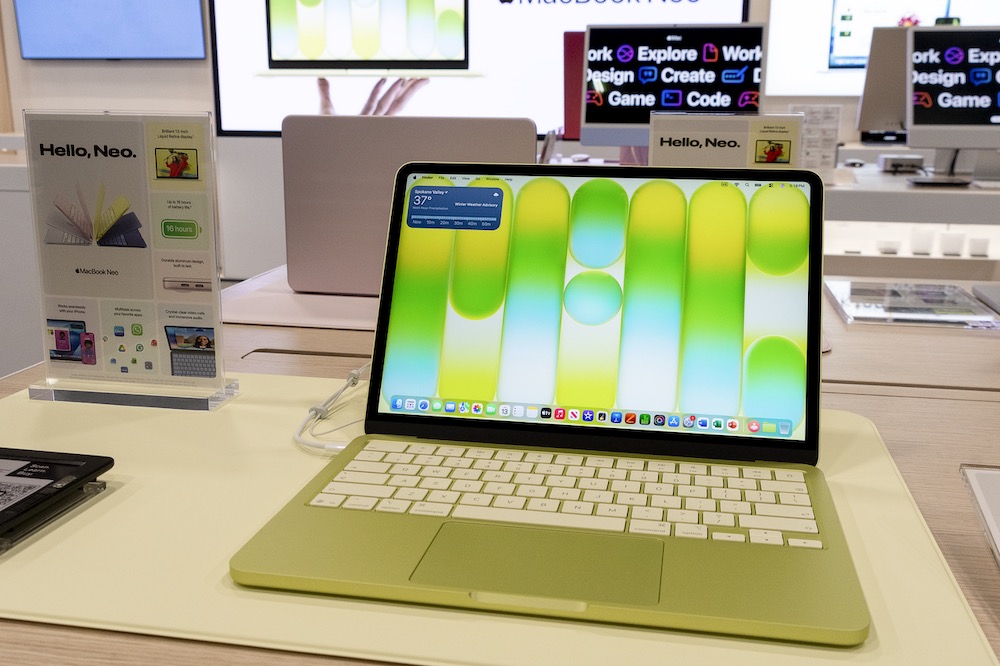
YouTubers put Apple’s cheapest laptop ever to the test in Ableton and Logic Pro. Here’s what actually happened.
Real talk. When Apple announced a $599 MacBook, producers across the internet had the same reaction: who is this actually for? The marketing said students and people who email a lot. But the specs told a different story. An iPhone chip in a MacBook. And you know what? A few YouTubers decided to skip the speculation and just cook something up.
We pulled the transcripts from four music production YouTube channels who tested the MacBook Neo live, in the studio, with real sessions. Here is what they found.
What Is the Apple MacBook Neo and Who Is It For?
Apple unveiled the MacBook Neo as an all-new laptop that delivers the Mac experience at a breakthrough price, starting at $599. That is not just cheap for a MacBook. It is $500 less than the MacBook Air, which starts at $1,099. You could literally buy two Neos for the price of one Air.
MacBook Neo at a Glance
Starting Price
$599 ($499 Education)
CPU Cores
6-core (2 performance, 4 efficiency)
Storage
256GB or 512GB
Ports
2x USB-C + headphone jack
Chip
Apple A18 Pro
RAM
8GB Unified (not upgradeable)
Display
13-inch Liquid Retina
Colors
Silver, Indigo, Blush, Citrus
The MacBook Neo is the most affordable laptop Apple has ever sold. It uses an Apple A18 Pro chip with a 6-core CPU and 5-core GPU, with 8GB of unified memory that is not upgradeable, shared between the CPU and GPU cores. That last part is the thing everyone keeps talking about. 8 gigs. That is it. No option to go higher. If you need more, Apple wants you buying a MacBook Air.
The A18 Pro is the same chip used in the iPhone 16 Pro. It is the first time Apple has used an iPhone chip in a Mac, though there is a lot of broader overlap between the A-series and M-series chips. This means there are no major software quirks that come with running macOS on it. Most people who pick one up will not even know the difference. The machine runs full macOS Tahoe. All your apps work. GarageBand comes free. Logic Pro is a $10 monthly subscription through Apple’s Creator Bundle. That bundle also gets you Final Cut Pro. For a kid just getting started, that is a scary good deal.
With the MacBook Neo, the lineup now has the Neo as entry-level, the Air as mid-tier, and the Pro line as the premium option. This is a real shift. Apple used to start at a grand. Now they start at six hundred bucks. That changes who can get into the Mac ecosystem entirely.
MacBook Neo and Logic Pro: How Does It Actually Perform?
Adam from I’m a Music Mogul ran a side-by-side benchmark between the MacBook Neo and an M5 Pro MacBook Pro worth around $4,500. Not a fair fight on paper. But the results were more interesting than expected.
He ran four tests with identical Logic Pro settings on both machines: the Mastering Assistant, a Stem Splitter, a chord analysis on a full Taylor Swift track, and a session export. The Mastering Assistant? The Neo finished only about 10 seconds behind the M5 Pro. For a machine that costs one-ninth the price, that is a respectable showing.
The Stem Splitter test was where the gap opened up. The Neo took roughly a minute and a half longer to complete the same task. That matters if you are running that feature constantly. If you use it occasionally, you can walk away and come back. Not a dealbreaker for a lot of workflows.
The most revealing test was simultaneous track playback. At 64 tracks in Logic, the Neo was running around 75% CPU. The M5 Pro barely hit 25%. By the time they got to 150 tracks, the Neo was at its limit. The M5 Pro kept playing all the way to around 920 tracks before hitting a system overload. That is not a comparison. That is a different class of machine entirely.
But here is the thing: 150 tracks of simultaneous Logic playback with effects plugins on every track is not a small number. That is a real, functioning session for most working producers. And when they loaded up Kontakt with a 3GB sample library, the Neo handled around 20 simultaneous instances without memory swap. With Serum 2, they got about 30 tracks before the system overloaded. The M5 Pro did 200 plus. Big difference. But 30 Serum tracks on a $599 laptop is genuinely impressive.
One creator tested the Neo on a real-world 28-track mixing session with a French singer named Leelu. He plugged in an Apogee Duet 3 interface, ran the session off an external SSD, and mixed. No crashes. No drama. He noted that Logic felt a little glitchy when running Final Cut Pro at the same time, with some clicks not registering. But solo? It held up. His take was that it performed similarly to an M-chip MacBook Air.
MacBook Neo and Ableton Live: Beat Making on a Phone Chip
One creator ran the Ableton test differently. No benchmarks. No comparisons. Just opened a session and started cooking. He loaded two personal sample packs, grabbed Arturia Analog Lab as his main plugin, threw down a drum loop, layered some MIDI chords, added a bass, added a melody, and started duplicating tracks.
With five or six Analog Lab instances running, the CPU sat at 21%. He kept duplicating until he hit 14 tracks, then pushed to 20 instances of Arturia before getting clipping. At that point he bumped the buffer size to 2000 samples and kept going. The session did not crash. It did not brick. It just needed a bigger buffer.
His honest assessment: as a beginner producer, running that many plugins on a laptop with a phone chip is impressive. He was not trying to run a 200-track orchestral session. He was making beats. And it worked. His one ongoing concern was not the raw performance today, but what happens a year or two from now when the drive is full of samples and plugins and the machine starts to slow down. That is a real concern with only 256 or 512 gigs of storage. If you are a heavy downloader, you will hit that ceiling.
He also pointed out something real about the market position of this machine. For someone who already has a MacBook Pro, the Neo becomes a travel laptop. A beater. Something you bring to a session when you do not want to risk a $5,000 computer. And for that use case, it makes a lot of sense.
The 8GB RAM Problem and Who This Machine Is Actually For
Let’s be straight about the RAM. 8 gigs is not a lot. One analyst from a Mac-focused benchmarking channel broke it down cleanly: Logic Pro and Ableton both only use the performance cores for audio processing. The A18 Pro has two performance cores and four efficiency cores. That means the Neo effectively has half the audio processing power of an M4 MacBook Air, which has four performance cores. His estimate put the Neo around 40 tracks in Logic under typical conditions, roughly on par with an M1 MacBook Pro. A computer people are still actively using in 2026.
The good news is that the machine uses its 8 gigs smartly. During the Kontakt test, there was zero memory swap. Apple’s unified memory architecture is efficient. The bad news is you cannot upgrade it. If you outgrow 8GB, your only option is a new laptop.
Every creator landed on the same conclusion about who this is actually for. If you are new to producing, if you are a student, if you want to get into the Mac ecosystem without spending over a grand, this is a real starting point. GarageBand is free. Logic Pro is $10 a month. The machine runs Ableton. It handles real sessions. It is not going to replace a MacBook Pro. It is not trying to.
One creator put it perfectly: if his mom had been able to buy him this when he was just starting out, he would have been happy for years. That is the target. Not the touring producer with a $6,000 rig. The kid at the kitchen table trying to figure out how to make their first beat.
The Verdict
For beginners, students, and travel producers, the MacBook Neo is a legitimately capable music production machine at a price point that changes who can get into the game. It is not a Pro replacement. But for what it costs, it does not need to be.
*Image: MacBook Neo (Citrus, 2026) by Locke Cole / CC BY-SA 4.0










One thought on “Apple MacBook Neo for Music Production: Is the $599 Laptop Worth It?”